
Download VirtualBox Extension Pack – virtual machine, virtualization tool, virtual OS, USB 2.0, RDP, PXE boot, open-source, emulator, Linux, Mac OS, Windows
Overview
The VirtualBox Extension Pack is an official add-on designed to expand the capabilities of the open-source virtualization platform, VirtualBox. Developed and maintained by Oracle, this tool enables users to run multiple operating systems—such as Linux, Mac OS, and Windows—on a single physical machine. By creating virtual environments, the Extension Pack helps developers, IT professionals, and tech enthusiasts test software, manage multiple platforms, and streamline system deployment without requiring dedicated hardware. It addresses the need for cross-platform compatibility, particularly in development and system administration workflows where access to diverse OS environments is essential.
The Extension Pack enhances VirtualBox by integrating advanced features that improve functionality and usability. It supports USB 2.0 devices, allowing seamless connection of peripherals like external drives, webcams, and mobile phones to virtual machines. Remote access via VirtualBox RDP enables users to manage VMs from different devices, making it ideal for remote work and server management. Additionally, PXE boot support for Intel network cards facilitates network-based OS deployment, a valuable feature in enterprise and lab environments. These capabilities make the Extension Pack a vital tool for users seeking flexibility, efficiency, and scalability in virtualized computing.
Although the developer did not provide additional technical details about user demographics, the app’s purpose is clear: to empower users with greater control over virtual environments. Real-world use cases include software testing across platforms, educational demonstrations, and secure sandboxing for system experimentation. In the broader app ecosystem, the Extension Pack plays a key role in supporting open-source virtualization by extending the core functionality of VirtualBox, reinforcing its position as a reliable, free tool for developers and power users alike.
Key Features & Functionality
- USB 2.0 Support: Enables direct access to USB 2.0 devices from within virtual machines, allowing users to connect external storage, input devices, and mobile phones without compatibility issues.
- VirtualBox RDP Integration: Provides remote desktop access to virtual machines using the Remote Desktop Protocol, allowing users to control VMs from any device with network connectivity.
- PXE Boot for Intel Cards: Supports network booting from a server, streamlining the deployment and provisioning of virtual machines in large-scale or lab environments.
- Enhanced OS Emulation: Allows users to emulate various operating systems, including Mac OS and Linux, enabling testing and development across platforms without physical installation.
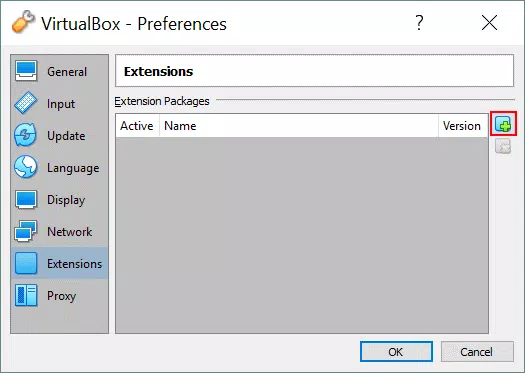
- Simple Installation via VirtualBox Interface: Users can install the Extension Pack directly through the VirtualBox application under File > Preferences > Extensions, ensuring a streamlined setup process.
Each feature serves a practical purpose in real-world scenarios. For example, developers can test mobile app functionality by connecting a smartphone via USB 2.0 to a virtual Linux machine. System administrators can remotely manage VMs on a server using RDP, reducing dependency on physical access.
In educational settings, instructors can demonstrate OS behavior using emulated environments without altering the host system. The PXE boot feature simplifies the creation of standardized virtual lab setups, where multiple VMs boot from a central image. The straightforward installation process ensures that users of varying technical skill levels can enhance their VirtualBox setup with minimal effort, maintaining usability across diverse user groups.
Interface, UX & Performance
The VirtualBox Extension Pack does not have a standalone user interface. Instead, it integrates directly into the existing VirtualBox application, extending its functionality without altering the core UI. Users interact with the Extension Pack through the standard VirtualBox preferences and settings panels, maintaining a consistent and familiar experience. The navigation flow remains intuitive, with features accessible via clearly labeled menus such as File > Preferences > Extensions.
Visual style aligns with the original VirtualBox design—minimalist, functional, and focused on utility rather than aesthetics. The layout prioritizes clarity and efficiency, with settings organized logically by category. While the developer did not list formal performance metrics, the Extension Pack is designed to operate efficiently within the VirtualBox framework, minimizing overhead on host systems. Responsiveness is maintained through tight integration with the core virtualization engine, ensuring that USB device access, remote connections, and network boot operations function smoothly under typical workloads.
Although the developer did not specify minimum OS requirements or performance benchmarks, the Extension Pack is compatible with the platforms supported by VirtualBox: Windows, macOS, and Linux. Stability is expected to be high, given Oracle’s oversight and the tool’s role as an official add-on. Users can expect reliable operation during extended sessions, though performance may vary depending on host hardware capabilities and virtual machine configurations.
Platform Compatibility & Technical Requirements
The VirtualBox Extension Pack is available for Windows, macOS, and Linux platforms. It is designed to work in conjunction with the VirtualBox virtualization software, which must be installed separately. The current version is 7.1.6, with a file size of 137.8 MB. The developer did not specify minimum OS requirements or hardware prerequisites beyond the general compatibility with VirtualBox.
Users should ensure that their host system meets the requirements of the base VirtualBox application, as the Extension Pack does not operate independently. The file size indicates a moderate download and installation footprint, making it suitable for systems with limited bandwidth or storage. Compatibility information was not fully disclosed, so users are advised to verify that their VirtualBox version is compatible with the Extension Pack before installation. The app is distributed as a free tool, with no licensing fees or subscription models.
Pros and Cons
Pros
- Official Oracle add-on with reliable support and updates.
- Enables USB 2.0 device access in virtual machines.
- Supports remote access via VirtualBox RDP for flexible management.
- Facilitates network-based PXE boot for efficient VM deployment.
- Simple installation through the VirtualBox interface.
- Free to download and use, promoting accessibility for developers and educators.
Cons
- Requires the base VirtualBox application to function.
- No standalone interface; integration is limited to the VirtualBox ecosystem.
- Specific system requirements were not disclosed by the developer.
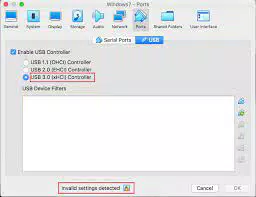
- Does not support USB 3.0 or higher, limiting high-speed peripheral access.
- May not be suitable for users unfamiliar with virtualization concepts.
FAQ
Is the VirtualBox Extension Pack free to use?
Yes, the VirtualBox Extension Pack is available at no cost. It is distributed as a free add-on by Oracle to enhance the functionality of the open-source VirtualBox platform.
Can I install the Extension Pack on any version of VirtualBox?
Installation compatibility depends on the VirtualBox version. Users should ensure their VirtualBox installation matches the version required by the Extension Pack (7.1.6). The developer did not provide a detailed compatibility matrix.
Does the Extension Pack support USB 3.0 devices?
Based on the provided information, the Extension Pack only supports USB 2.0 devices. There is no mention of USB 3.0 or higher support.
Is the Extension Pack safe to download and install?
Yes, the VirtualBox Extension Pack is an official Oracle product. It is distributed through trusted channels and is considered secure for users who download it from the official VirtualBox website.
How do I update the VirtualBox Extension Pack?
Updates are typically delivered through the VirtualBox application. Users can check for updates by navigating to File > Preferences > Extensions and reviewing available versions.
Final Thoughts
The VirtualBox Extension Pack is a powerful, no-cost enhancement that significantly boosts the utility of the VirtualBox virtualization platform. Its support for USB 2.0, RDP access, PXE boot, and cross-platform emulation makes it indispensable for developers, IT professionals, and educators who rely on virtual environments. The seamless integration with VirtualBox and straightforward installation process ensure a smooth user experience, even for those new to virtualization.
While it lacks support for newer USB standards and requires a base VirtualBox installation, these limitations are offset by its reliability, official backing, and comprehensive feature set. For anyone seeking a flexible, secure, and free virtualization solution, the Extension Pack delivers exceptional value. It stands out in the productivity and utility category by offering enterprise-grade capabilities without a price tag.
Download VirtualBox Extension Pack now


